Quick answer: Choose a phone case in this order: confirm the exact device model, check camera and button geometry, decide how much protection your routine needs, then choose the artwork. A design you love cannot rescue a case made for a similar-looking phone.
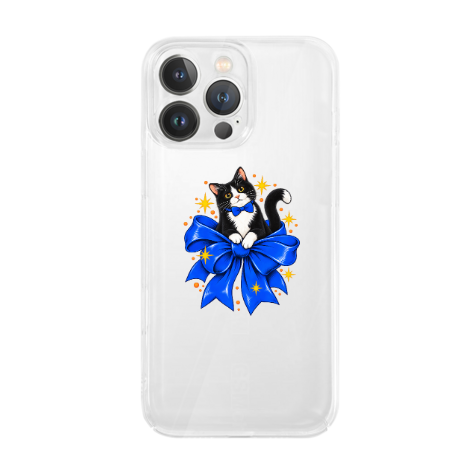
A phone case is unusually personal: it is carried, handled, photographed, and seen dozens of times a day. That makes it a strong gift and a useful place for expressive artwork—but only when the technical fit is right. This guide gives you a repeatable way to choose a case without guessing from screen size or a familiar model name.
Start with the exact phone model—not the family name
“iPhone,” “Galaxy,” or even a numbered family is not precise enough. Phones in the same generation may differ in body size, camera layout, button position, and charging hardware. Before shopping, open the device settings and copy the full model name. If available, compare the model number as a second check.
| Check | Where to verify | Why it matters |
|---|---|---|
| Exact model name | Settings → About phone/device | Separates standard, Plus, Pro, Pro Max, and similar variants |
| Camera layout | Compare the real phone with listing images | A wrong opening can block lenses, flash, or sensors |
| Button positions | Inspect both side edges | Misaligned covers make controls difficult to use |
| Charging method | Check cable and wireless routine | Case thickness and accessories may affect convenience |
Select the case by the exact model name; two models can share an advertised screen size while using different dimensions or camera openings. Screen size describes the display diagonal, not the complete shell geometry.
Use a three-part fit test
1. Openings
Camera, speaker, microphone, charging port, and other openings should align with the actual device. Compare their number, shape, and placement—not just the general silhouette.
2. Controls
Confirm the power and volume controls line up. A button cover should press cleanly without constant force. If the phone has an action switch or other model-specific control, verify that access explicitly.
3. Edges
Look for clear listing information about the screen edge, camera surround, corners, and material. Use the current product listing to confirm the visible edge design and any stated protection details.
Match protection to the owner’s real routine
Protection needs are behavioral. Someone who keeps a phone in a separate handbag pocket faces a different risk from someone who works outdoors or regularly hands the phone to children.
- Low-friction everyday use: prioritize comfortable grip, accessible controls, and a shape that moves easily in and out of pockets.
- Busy commute: look carefully at corner coverage and how securely the phone sits in the shell.
- Travel and outdoor use: verify the manufacturer’s stated construction and compatibility with the owner’s charging and mounting setup.
- Frequent photography: camera clearance and a non-obstructive edge matter as much as the printed design.
A case reduces certain everyday risks; it does not make a phone indestructible. Treat any protection claim as product-specific and verify it on the live listing.
Choose artwork that survives the hardware
Phone-case artwork lives around functional interruptions. The camera opening occupies valuable space, curved edges can crop details, and hands cover the lower center during use. Strong compositions plan around those realities.
| Design type | Usually works well | Watch for |
|---|---|---|
| Single character or pet | Face placed away from the camera opening | Ears, eyes, or text lost near the top corner |
| Repeating pattern | Small motifs that tolerate edge cropping | One important motif becoming partly hidden |
| Name or short phrase | High contrast and generous safe space | Long text, tiny letters, or text under fingers |
| Transparent-background art | Bold outlines that work with the phone color | Low contrast against the recipient’s device |
The Bow-Tied Cat Clear Phone Case is a useful real-store reference for how one recognizable accessory and a clear expression can carry personality on a compact surface. Check the current listing for exact model options and product details before ordering.
For a gift, collect facts without ruining the surprise
Ask a natural question, check a family-shared device list, or have a trusted person confirm the model in Settings. A photo of the phone’s back can help with camera layout, but it does not reliably identify every variant. Record the exact answer in the order notes instead of relying on memory.
Gift decision checklist
- Exact device model copied from Settings
- Camera layout visually matched
- Recipient’s usual charging method considered
- Protection level matched to daily routine
- Artwork positioned around cutouts and hand placement
- Name or message spelling verified
- Current availability and delivery timing checked
Make a personalized case feel like the person
Personalization does not have to mean printing a full name. A pet’s expression, an inside joke, a color combination, a shared trip, or one oddly specific object may feel more personal than generic initials. A strong cue feels recognizable to the recipient and remains visually clear to everyone else.
If you want to explore a case built around a photo or personal reference, prepare one main image, list the details that must remain recognizable, and submit the idea through Create Your Own. Feasibility, compatible models, pricing, and production details must be confirmed before purchase.
Common mistakes to avoid
- Buying by screen size: it does not confirm body or camera geometry.
- Assuming every model is offered: availability changes; verify the live variant selector.
- Putting the main subject under the camera: design for the cutout before approving the composition.
- Using tiny text: phone cases are viewed in motion and often from arm’s length.
- Making unverified protection assumptions: use only the claims provided on the exact listing.
The 60-second final check
Read the model name aloud, compare the camera cluster, test the intended composition against the top corner, and ask: “Will this still feel good to carry every day?” If all four answers are clear, you have moved from a decorative guess to a practical, personal choice.
Last reviewed: September 10, 2026. Device compatibility, case construction, and available variants can change; verify the current product page before ordering.
Continue this decision
Use the guide that matches the next fact you need to check: